> For the complete documentation index, see [llms.txt](https://docs.airship.gg/llms.txt). Markdown versions of documentation pages are available by appending `.md` to page URLs; this page is available as [Markdown](https://docs.airship.gg/editor-extensions/extending-the-editor.md).
# Extending the editor
Since Airship uses Unity, most of the custom editor features will work as-is. Some examples of features you might may want to add to your project:
* [Adding editor menus](https://docs.unity3d.com/6000.0/Documentation/ScriptReference/MenuItem.html)
Airship also has our own analogous versions of Unity features such as
* [Adding custom property inspectors for `AirshipBehaviour`s](/editor-extensions/custom-inspectors-c.md)
### Before you begin
If you are planning to write C# scripts for the editor, it's recommended you turn *off* the TypeScript compiler *while* you write C# editor code.
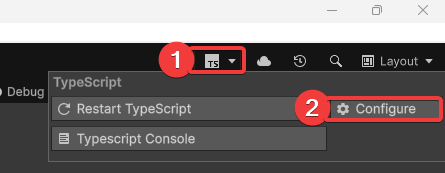
How to access the TypeScript service settings
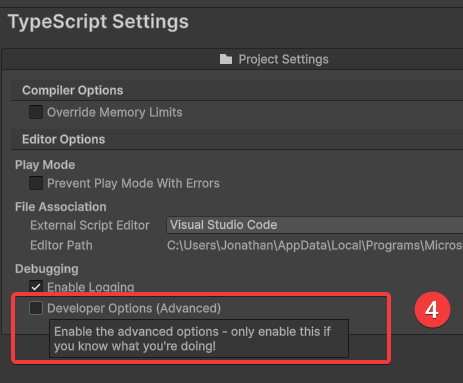
Developer Options setting, which will allow more settings for the TypeScript compiler
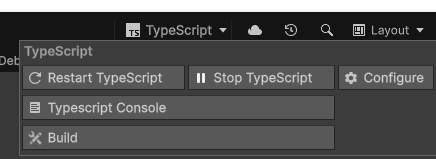
This will change the TypeScript menu to add options to start/stop the compiler. This can be utilized to stop the compiler recompiling each time you make a C# change.
TypeScript developer mode
### Airship Editor C# API
Airship has the following user editor APIs you can use:
* \
`AirshipSerializedProperty` and `AirshipSerializedObject` for handling Airship Behaviour property serialization
* `AirshipCustomEditors` for querying the registered custom inspectors for AirshipBehaviours
* See [AirshipBehaviour inspectors](/editor-extensions/custom-inspectors-c.md) for how to add custom editors
* `AirshipType` which is the Airship version of `Type` for TypeScript-based types.
* Types can be queried using `AirshipType.GetType(name)`
* `AirshipEditorGUI` - for drawing editor properties for `AirshipSerializedProperty` instances using IMGUI.
* `AirshipGUI` for general Airship GUI state
* `TypescriptService` for general TypeScript APIs
* `TypescriptProjectsService.Project` for querying the project settings
* `TypescriptCompilationService` for querying the compiler state